Configuring SRT Output
When creating the pipeline’s output side, you can choose to send the traffic via SRT to make the connection more reliable and prevent image loss during transmission. In the Output stream sink section, you can select Type – SRT which will add the SRT configuration options, see Figure 43. Similarly, as for Input configuration you can choose between 2 modes – Caller, Listener.
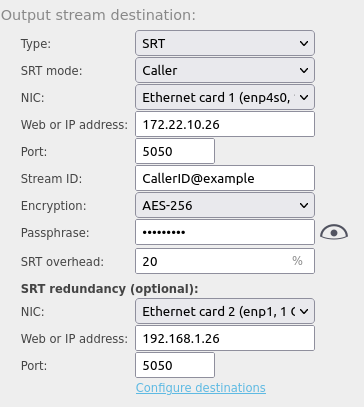
When you select SRT mode:
- Listener – Specify the port of the local machine where an external Caller unit will request a connection so the output which is being configured can start sending data. If "Any" interface is selected, the SRT connection on the selected port is accepted on all interfaces, thus automatically supporting redundant sources - SRT bonding (for details, see section 4.4). Upon selecting a specific interface, a local IP which is listened on, may be also specified.
- Caller – IP:port of the remote machine where the external unit is waiting to receive data
In addition, you should define the SRT overhead parameter - an amount of % over the Total Bitrate that can be surpassed in order to achieve the lost data recovery. As a result, the maximum used connection bitrate equals to configured Total Bitrate + SRT overhead. In general, this is the upper limit and connection does not require it for normal operation.
Similarly, to the input configuration, the SRT encryption is supported on the output, too. In output, you have to select which cipher would be used. The available options are AES-128, AES-192, and AES-256. We recommend using AES-256 encryption whenever possible and a strong passphrase where you can use any printable character.