Creating 2110 Output Configuration
The output stream configuration allows you to specify the flow type, indicating whether the output is ST 2110-20 (audio) or ST 2110-30 (video).

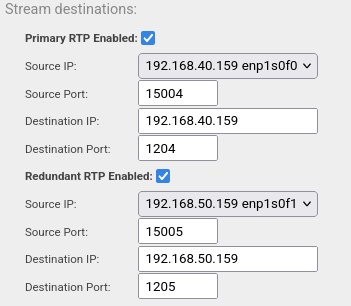
- Primary RTP: Main stream destination.
- Redundant RTP: Backup stream destination for seamless protection switching, compliant with 2022-7. (Refer to the checkbox in the UI for this option.)
- Source IP: Dropdown menu to select the network SFP interface by its assigned IP address.
- Source Port: Field to specify the source port for output streaming.
- Destination IP: Can be configured for either unicast or multicast.
- Destination Port: Field to specify the destination port for transmitted packets.
Both source and destination ports can be auto-assigned. The pipeline start will revert to the selected port configuration.
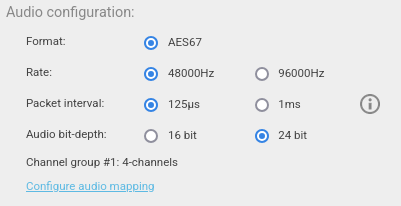
For audio configuration, at least one audio channel must be specified in the "Configure Audio Mapping" dialog. Additional configurations for standard Conformance Levels (A/AX, B/BX, C/CX) depend on the selected rate, packet interval, and audio bit depth.
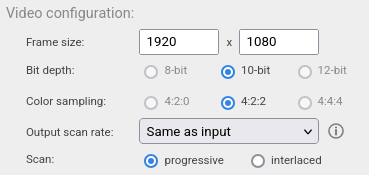
The output frame size offers several options, including:
- UHD
- QHD
- FullHD
- HD
- SD PAL
- SD NTSC
The encoder supports only 10-bit depth and 4:2:2 color sampling. All frame size options can be configured for either progressive or interlaced output.